

Mobile Digital Recording
FAQs, Tech Tips and Diagnostic Workflows
FAQ’s
With the Brigade Mobile Digital Recorder (MDR) 600 Series, how is the footage downloaded?
MDR 600 Series
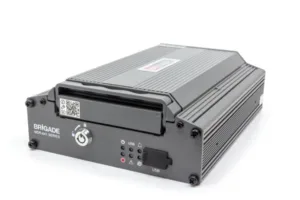 |
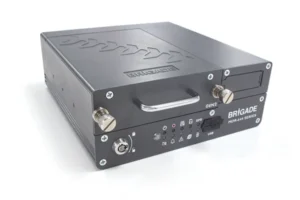 |
MDR-641 |
MDR-644 |
What is required:
1. Software – MDR Dashboard 6.0 onwards. Download here: MDR DASHBOARD 6.0
2. MDR-USB-B-02 (5195) MDR USB A to B Cable (USB 3.0)
[For the MDR-641 the MCU Reader and Cable MDR-MCU-R-01 (7053) is also required]
3. MDR-KEY-01 (4891) MDR Security Key
Useful links:
With the Brigade Mobile Digital Recorder (MDR) 500 Series, how is the footage downloaded?
MDR 500 Series
 |
 |
MDR-504 |
MDR-508 |
What is required:
1. Software – MDR Dashboard 6.0 onwards. Download here: MDR DASHBOARD 6.0
2. MDR-USB-B-02 (5195) MDR USB A to B Cable (USB 3.0)
OR MDR-USB-B-01 (4884) MDR USB A to B Cable (USB 2.0) [This will not support USB 3.0 transfer speeds]
3. MDR-KEY-01 (4891) MDR Security Key
Useful links:
With the Brigade Mobile Digital Recorder (MDR) 400 Series, how is the footage downloaded?
MDR 400 Series
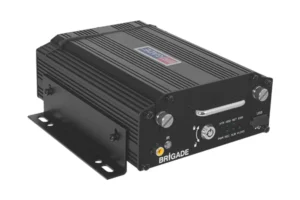 |
 |
MDR-404 |
MDR-408 |
What is required:
1. Software – MDR Dashboard 6.0 onwards. Download here: MDR DASHBOARD 6.0
2. MDR-USB-B-02 (5195) MDR USB A to B Cable (USB 3.0)
OR MDR-USB-B-01 (4884) MDR USB A to B Cable (USB 2.0) [This will not support USB 3.0 transfer speeds]
3. MDR-KEY-01 (4891) MDR Security Key
Useful links:
With the Brigade Mobile Digital Recorder (MDR) 300 Series, how is the footage downloaded?
MDR 300 Series
 |
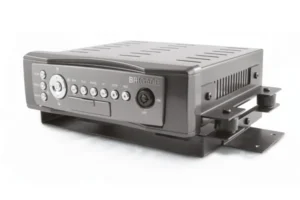 |
MDR-304 |
MDR-304A |
What is required:
1. Software – HDD Viewer for MDR-304 – HDD Viewer 2.37 and for MDR-304A – HDD Viewer 2.05.12
2. USB-001 (2918) Mini USB to USB A cable
3. MDR-304-SK (2994) or MDR-KEY-01 (4891) MDR Security Key.
MDR-304 User Manual & MDR-304A User Manual
I have the MDR Dashboard or HDD Viewer software, but why does it not see the HDD when connected?
For the MDR 300 and MDR 400 Series you will need to run the Dashboard in Administration mode. Right-click the desktop icon and select “RUN AS ADMINISTRATOR”

How do I download my footage locally from my MDR to my Laptop/PC?
This guide includes:
- A detailed overview of the MDR Dashboard 6.0 software
- A list of the required equipment
- A clear, step-by-step walkthrough for:
- Downloading footage from the MDR
- Downloading footage directly from the vehicle
How do recover footage from my SD if my HDD fails?
In the event that your HDD (Hard Disk Drive) has failed and you need to recover footage from a recent incident. It is possible that your most recent footage will be saved on the SD card inside your MDR. Please see our guide below for more details that include:
- Where the SD Card is located in your MDR.
- Instructions on how to remove the SD Card.
- Links to each MDR instruction manuals.
- Link to MDR Dashboard 6.0 software.
- Instructions on how to connect your SD Card to your laptop/PC and how to view your Footage.
Note: This guide covers MDR 600, 500 and 400 series, this method will not be possible on the MDR 641 as it does not have a SD Card.
How do I setup a mirror image on the MDR-500 series?
You will need to login to the MDR setup menu and navigate to the Surveillance menu option -> live view -> Preview -> then select image setup.
Please see our guide below for more details that include:
- How to login to the MDR setup menu.
- How to change normal view to mirror view.
- Saving your new Setting.
Note: This guide covers MDR 504 & 508 (only).
How do I setup a mirror image on the MDR-600 Series?
If your camera is set to normal view in the MDR and you need to change it to Mirror view or vice versa.
Please see our guide below for more details that include:
- How to Login to the MDR Setup menu.
- How to change normal view to mirror view
- Saving your new setting.
Note: This guide covers MDR 644 & 641 (only).

How do I enable or disable the audio on the cameras on MDR-600 series?
This guide is designed to explain:
- How to enable or disable audio recording for each individual camera channel on an MDR-600 Series, for both Main-Stream and Sub-Stream recordings.
- How to save your changes.